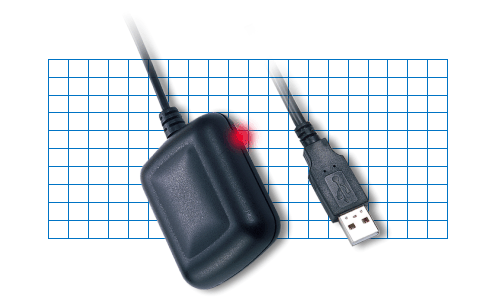
USB GPS
|
Latest Installer (requires MapPoint 2004 and the
.NET Framework v1.1):
Issues:
- A lot of things are still hard coded; consider this project a proof
of concept right now
- Something in my code, in MapPoint, or in the .NET Framework is
keeping the MapPoint.exe process alive even after you close it.
I am looking in to this, and I have made quite a bit of progress, but
the problem definitely still exists.
Latest Source Code:
|
|
|
2004/02/28 PM - Finally...progress!
What a wild week! The software was acting weird too, and I was
about ready to give up on it.
My interpretation of the GPS coordinates was close in global terms (the
lat/long was accurate to the "ones" digit), but it was pretty far off in
local terms.
I searched for days on the web for people with similar problems but I could
not find anything relevant.
Finally I realized what I was doing wrong, and now I feel like an idiot.
The GPS device outputs lots of NMEA "sentences", and the one I am mostly
interested in [for now] is $GPRMC:
$GPRMC,030013.810,A,4749.2835,N,12212.2620,W,0.05,326.32,230204,,*1B
This means:
- Latitude: 47 degrees and 49.2835 minutes North
- Longitude: 122 degrees and 12.2620 minutes West
I was taking 4749.2835 and 12212.2620 and just dividing by 100.0 and
passing them straight on to MapPoint.
DOAH!
A simple conversion from the NMEA string to the decimal lat/long was all
that was needed:
char* pszBuffer =
"4749.2835";
double fValue = _tstof(pszBuffer) / 100.0;
int iDegree =
(int)fValue;
double fMinute
= (fValue - iDegree) * 100.0;
fValue = iDegree + (fMinute / 60.0);
return fValue;
With that MapPoint started displaying the coordinates correctly.
I then also found a simple flaw in my native C++ code COM port reading
thread's main loop that was definitely preventing the thread from shutting
down.
I fixed that, but I will have a problem with the MapPoint.exe process
continuing to run even after the application is closed.
Oh well, I fixed the biggest bug that was bothering me, and I am pretty
sure I can find a fix or a hack for the closing problem.
Progress...alas!
It's enough for me to post my latest binaries here so that I can start to
try them out in my car.
(Can anyone say "Auto-Update"? :))
Don't expect too much from the binaries...in fact I think they are hard
coded to use COM3! :P
|
2004/02/21 AM - I swear! The hardware was less frustrating than
the software!
This is what I hate most about software; it's crap!
Now, DevStudio is an OK piece of software, but I am running in to problems
that I cannot find simple solutions to.
Here are my 3 complaints/problems:
- ATL/WTL/MFC won't interop!
Why does an ATL dll project not let me use WTL dialogs?
I want PropertyPages but I *really* do not feel like writing my own
CPropertySheet and CPropertyPage classes!!!!!
(I am capable of doing it, I just have better things to do with my time)
How do developers use property pages in their software and NOT tear their
hair out?!?!?
I could resort to putting MFC dialogs in my ATL app, but this brings up
another problem (other than that it sucks)...
Why does an ATL project not allow MFC?
You can, however, add ATL support to MFC, so another solution would be to:
- Create a generic MFC dll project
- Add ATL support to the MFC project
- Add the MapPoint Add-In as an ATL dll
- Add the dialogs as MFC CDialogs
YUCK! I refuse to consider that until I have explored all other
options...including C#...
- In Visual Studio.NET 2002, the C# "Shared Add-in" wizard does not work
"out of the box"!
I start the wizard and unselect all of the extensible applications except
MapPoint.
I finish the wizard and it generates the project for me.
I set a break point in "OnConnection" and "OnDisconnection" and then start
the debugger...
VISUAL STUDIO LOADS!!!!!
OK, I was expecting MapPoint to load!
So, I change the dll's launching application to MapPoint.exe
I also have to manually add "applicationObject = null;" to "OnDisconnection"
- I start the debugger again and I hit my 1st break point.
I stop the debugger and modify the code to add a menu command to the
application.
The menu command is very simple, and I have done this in the past before
with no problems.
I start the debugger again and click on the new menu command.
I hit the breakpoint in OnDisconnection.
What the hell is going wrong?!?!? :)
It may be PEBKAC: Problem Exists Between Keyboard And Chair
(Later in the day I realized that the menu command's method must be
declared public!)
Ah, at least I can laugh about how stupid this all is.
So, yes, I am considering going to C#.
I tried this many months ago and got pretty far in to it when I decided that
I would rather write more efficient unmanaged C++ code.
Because of the ATL/WTL/MFC problems I am running in to I am reconsidering
that decision.
Besides, this summer I will upgrade my hardware to a 1GHz Nehemiah w/ 512MB
RAM; I think I can afford the hit of the .NET Runtime.
Another software frustration: .NET will not talk to [what they call
"legacy"] serial ports!
Thus I still need to resort to some native C++ code (in the future I might
make this managed code).
The general idea is thus to have a native C/C++ dll that exposes only a few
functions:
HRESULT GetSerialPorts(LPGETSERIALPORTINFO_ROUTINE
lpGetSerialPortInfoCallback)
HRESULT StartGPS(LPCTSTR pszComPort)
HRESULT StopGPS()
HRESULT GetLastKnownGPSPosition(GPSPOSITION* pGPSPosition)
The C# code then just P/Invokes those methods as needed.
This has its obvious problems, but it works fairly well.
Again, in the future I might make the C++ code "managed".
.NET goes against some of my CarPC "embedded" philosophies, but these
days I am all about maintaining my sanity.
Car.NET; that's kinda catchy! ;)
|
2004/02/16 PM - Urrgurr Burrgurr!
DAMN! I think I may have hit a brick wall! :(
Here is what I was trying to do:
- The MapPoint C++ Add-In Wizard generates ATL code
- You cannot insert MFC code in to ATL code
(You can, however, do the opposite: insert ATL in to MFC code)
- I don't want to code in MFC anyway (yuck fooey)
- I decide to bite the bullet and implement all of my dialogs in ATL/WTL
as a separate application that I would later reverse integrate in to my
ATL dll
(sounds logical, right?)
- I work on my ATL dialogs for two weeks and they are finally ready to
integrate back in to my ATL dll
- During the porting I notice that...
- The dialog app's base template classes refer to the WTL class:
CAppModule _Module;
- The add-in dll's base template classes refer to the ATL class:
CAddInModule _AtlModule;
CAddInModule is in fact:
class CAddInModule :
public CAtlDllModuleT< CAddInModule >
- The CAppModule and CAtlDllModuleT classes do not appear to be
compatible
(they generate compiler errors when used together)
- Removing the CAppModule and renaming the CAddInModule to _Module
fails to compile:
CAddInModule is missing a few functions that are in CAppModule
- Creating a 3rd class that inherits from them both fails to compile:
ambiguous conflicts in pure ATL "atlbase.h" and WTL "atlapp.h"
- I cannot find an appropriate derivative of CAddInModule that will
make my WTL dialogs happy
- I don't know ATL/WTL or templates well enough to understand what is
wrong so that I can fix it correctly
So, now I have these nice swooby ATL/WTL dialogs and I cannot find a way
to use them in my ATL dll!!!!
How frustrating is that?!?!?!
Unfortunately, here is what I may end up trying:
- Create a generic MFC dll project
- Add ATL support to the MFC project
- Add the MapPoint Add-In as an ATL dll
- Add the dialogs as MFC CDialogs
It sounds stupid, I know, but if I am starting to run out of ideas that
will allow me to use my ATL/WTL dialogs in my ATL dll!
So, I may be delayed for awhile until I figure this out. :(
This is exactly the sort of road block that can make me totally give up on a
project!
Jeesh!
|
2004/02/14 PM - Happy Fuckin Valentines' Day! :)
Here I sit on a Valentine's Saturday night working on my GPS software. :)
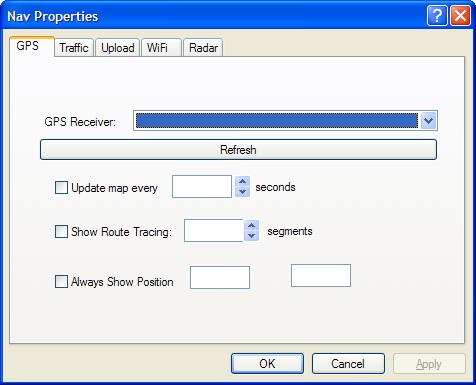
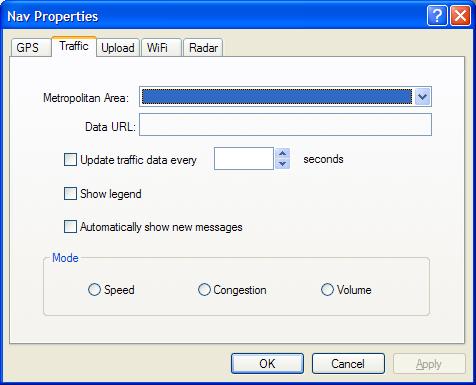
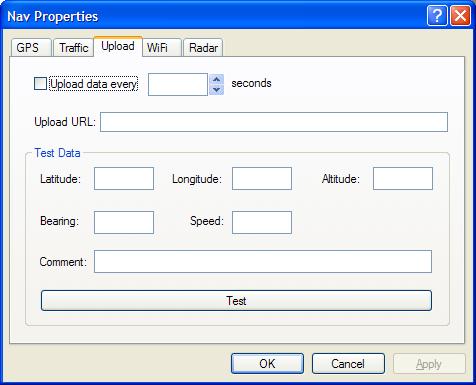
Here are some screen shots of my current UI progress:
- The GPS and Upload tabs will be the first tabs fully implemented.
- The Traffic tab will be fairly easy to implement for Seattle, but
support for other metropolitan areas will require some more thinking.
Seattle provides a ton of development resources on their Metro web site.
I will provide a list of the links I use at the end of this log entry.
- The WiFi and Radar tabs will not be implemented for many months down
the road.
The WiFi portion is actually already 100% functional, but the code came
from a co-worker and I want to make sure:
- He is cool with me publicly using it
- We are not calling any undocumented Windows functions
Here are those Seattle Metro links I mentioned above:
|
2004/02/03 PM - Still hanging in there
Development slowed this past week or two while I dealt with a sick pet.
Yeah yeah yeah, excuses excuses...but
just look at the poor dude! :(
I have vastly improved the UI and am adding UI for the following
features:
- GPS General
- GPS Upload
- Traffic
- WiFi
- Radar
I will describe each area more as I begin to get them implemented.
For now, GPS General and GPS Upload are the main areas I am working on.
The final UI classes will determine where the GPS thread exists and how it
actually works.
I am almost done w/ designing the UI classes, so the GPS thread should be
fully implemented in a couple of weeks.
|
2004/01/26 PM - Unappreciated Process
Things have progress better than I expected, so I took today to go ahead
and tidy up some of the code.
There is no new code to post tonight!
After tonight the only part of the code that really bugs me is the
EventSink stuff.
I sort of understand its purpose, but it ain't pretty code.
I will look in to that as I am working on the drawing routines.
I've tried to move all of the threading code in to their own wrapper
classes.
This makes it much easier to read the code, but I haven't worked out the
kinks of how it all interacts.
The GPS Thread itself, CGPSThread, is really nice and self contained.
I could drop the class in to any part of the app and it should work just
fine.
I have no idea there the best place to put the drawing thread,
CMapDrawingThread, is.
I haven't even truly placed it in the application yet; it compiles is about
all it does right now.
So, here is the basic programmatic structure
As I said, "CMapDrawingThread : AThread" is not placed in the application
yet.
I need to think about where to best put it, or if I should shift things
around a bit.
What's bugging me most is:
- Why is CGPSThread inside the CGPSSetupDlg?
It's there right now because it makes it easy to get configuration
changes from the dialog.
Maybe I will move both thread classes in to the CConnect class, and then
push config changes from the dialog.
For some reason I am thinking that the "Apply" button on the dialog
complicates things.
ex: The GPS device/connection would need to be reset if the user makes a
change and hits "Apply".
Maybe there is a simple solution that I am not seeing @ 1:33AM.
Maybe I am talking to myself here for no reason? :)
'Night!
|
2004/01/26 AM - GPS Implemented...sortof
Woot! I got the beginnings of GPS and WebUpload working.
The code is not very pretty right now; I should hopefully fix this one of
these days.
The latest drop is available at:
http://www.swooby.com/z/navpc/gps/drop/gpswhere 040126.zip
So, the basics are there:
- I can read GPS info from the serial port
- With the push of a button I can upload custom coordinates to a web
site
- With a few more lines of code I should be able to combine the two
Next I need to start working on:
- Proper timing and control of thread events
- Drawing shapes, lines, and pins on the map
|
2004/01/25 PM - Researching GPS
Here are the sources for GPS source code that I have found:
|
2004/01/25 AM - Improved Add-In, still no GPS yet
My evolving version of "Hello MapPoint" is now named "GPS Where".
Tonight I modified "GPS Where" to do the following:
- Read stored values from registry
- Fall back to default values if they do not exist
- Enumerate all COM devices
- Added a configuration dialog to set values
- Replaced the 4 menu items with a single menu item that loads the
configuration menu
- Removed some unnecessary code
(there is still quite a bit of old code to remove, mostly related to the
GPS)
The drop is available here:
http://www.swooby.com/z/navpc/gps/drop/gpswhere 040125.zip
|
2004/01/24 - Hello MapPoint
I have written an obligatory "Hello World" MapPoint application.
It is available here:
http://www.swooby.com/z/navpc/gps/drop/hello_mappoint.zip
For the life of me I cannot find anything like this out there on the
internet; I am surprised.
The source code shows how to create a MapPoint Add-In that responds to menu
events.
It is not thoroughly tested, so use it at your own risk.
Now that that MapPoint skeleton is written I get to start working on the
GPS skeleton.
There are lots of resources out there for GPS development, but very few of
them are free.
There also appear to be two ways to program USB GPS devices in Windows.
- As a Human Interface Device (HID) (windows specific)
- As a COM port device (platform independent)
I will evaluate both options in the next few days.
|
2004/01/23 - Foo, what a crock!
YOU try to find a decent article that explains how to program a MapPoint
add-in using C++.
I can find a million VB/C# examples, but I cannot find anything useful for
C++.
The only things I can find are these:
http://www.cheztabor.com/AtlAddIn/
http://support.microsoft.com:80/support/kb/articles/Q230/6/89.ASP
http://msdn.microsoft.com/library/default.asp?url=/library/en-us/dno2kta/html/comaddins.asp
The problem is that these are not MapPoint specific, and they do not show
how to program using the MP object model.
What a crock!
Ah, I have some sample code at work.
Thank God I work you know where.
|
2004/01/22 - Getting started...
I will be writing a MapPoint Plug-In for GPS info.
I will try to write this as a pure native C++ app, but I have only written
C# MapPoint plugins in the past, so I may have my work cut out for me.
Why not C#?
Well, read this:
http://www.dotnet247.com/247reference/msgs/35/179384.aspx
One word: "Yuck!"
What I need to find is a really good C++ GPS library.
Maybe this will suffice:
http://www.codeproject.com/system/gps_support.asp
http://www.samblackburn.com/nmea0183/
I DO plan to share out the code once I get it stabilized, but I DO NOT
plan to make it an open-source collaboration of any sort. |